We now shift from the mathematical world to the world of computers and software. We start with a brief overview of the goals of product management and software engineering (Section 7.1.1). This includes the development of model software engineering processes tailored for use in professional and undergraduate mathematics research. Next, we use the engineering concepts of Section 7.1.1 to compare and contrast a collection of tools currently available for use in knot theory research (Section 7.2). Using the analysis of current tools, and our software process we define a set of requirements and a system design for a new general purpose knot theory software toolbox (Section 7.3). Finally, using this system design, and following our process, we present documentation for the software units that satisfy the tabulation theory of Chapter 6 Tabulation.
7.1Basics of Product Management and Software Engineering
7.1.1Project vs. Product
One of the most pervasive ideas held by amateur software developers is that documentation means simply commenting your code. This idea and its consequences are one of the fundamental differentiators between a piece of software being a project or becoming a product. A project is short-lived with no consideration of long-term reuse or usage by a community. Much preferred is the creation of products that are long-term, reusable, extensible, and portable investments of time and energy (effort).
The creation of a product requires planning and documentation of a system far beyond simple code comments. When developing a product, we must include thoughtful and deliberate consideration of the goals and how we will achieve them. For example, identifying where effort invested now to create a robust system can save effort later, and enumerating and analyzing risk to the product can reduce the chance of total product failure.
The creation of a software product has two phases, a generic (not software specific) high-level product management/development phase followed by a detailed software engineering phase. Having this two-pass approach allows for the product to be well and thoroughly defined and assessed before any technical engineering work is started, reducing the risk of a product being intractable based on the product constraints. The remainder of this chapter will give context to product management and software engineering practices, with preparing undergraduates for research as the goal. We will start with a design for a course on teaching project management to undergraduate researchers. We then develop a software engineering process for use in mathematics research.
7.1.2Instruction of Product Management
Undergraduate researchers, in most academic disciplines, have little exposure to systematic product management. Outside a structured classroom setting, an undergraduate researcher may have never completed a project, let alone worked on a product. Giving undergraduate researchers a minimal set of product management tools increases their ability to estimate and bring together successful products.
In this section we describe a course design for a basic undergraduate course in product management. The perspective of the course design is not software focused but is intended for general use across disciplines. In six weeks of instruction, this course introduces students to the key concepts in product management needed to ideate and systematically complete complex products. The design utilizes the “Backward Design” of Wiggins and McTighe 1. Many of the ideas come from Pressman and Maxim 2 but have been massaged to be less software focused. Full course design and template documents are found published on GitHub 3.
7.1.3Software Engineering and Life Cycle
The second stage of software product development is the software engineering process. Just as in the product management section (Section 7.1.2), we are approaching the software engineering process from an undergraduate training perspective. However, unlike our discussion of general product management, we assume some prior knowledge of software practices. We assume familiarity with programming, types of programming languages, and the basic structure of a program. If the reader feels unprepared, they may find it useful to complete one of the many free asynchronous online courses offered by major universities[1] and browse a standard introduction to computation text such as “Introduction to the Theory of Computation” by Sipser 4. With this in mind, we will focus on engineering processes needed for our tangle tabulation use case, omitting discussion of the practice of programming itself.
We will first define what steps we will take as part of our model process and any quality gates[2] to be satisfied before moving between those steps. We call this collection of steps and transitions a software life cycle. Rather than reinventing the wheel, we will build on top of an existing life cycle model. There are several existing models available to us, the most common processes used in industry are agile models such as extreme programming 5 (Figure 1a) and scrum 6 (Figure 1b). Less common in industry but historically relevant are linear models such as the waterfall7 (Figure 1c) or the V model8 (Figure 1d).
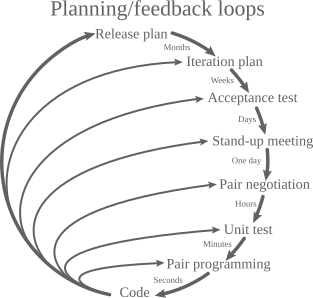
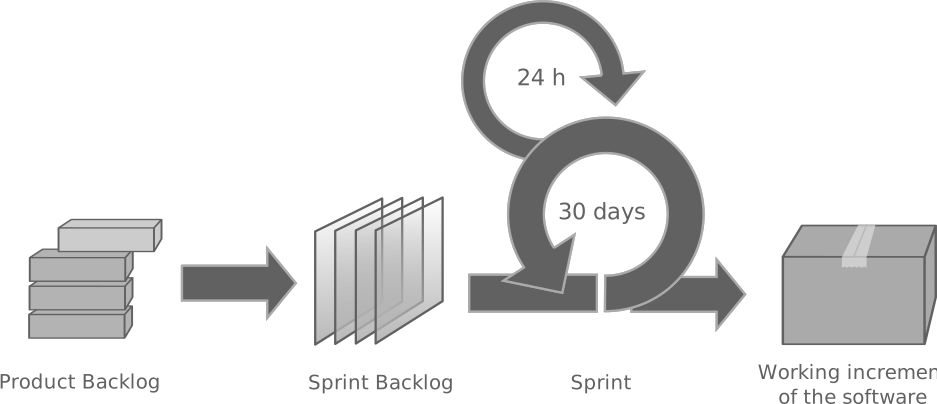
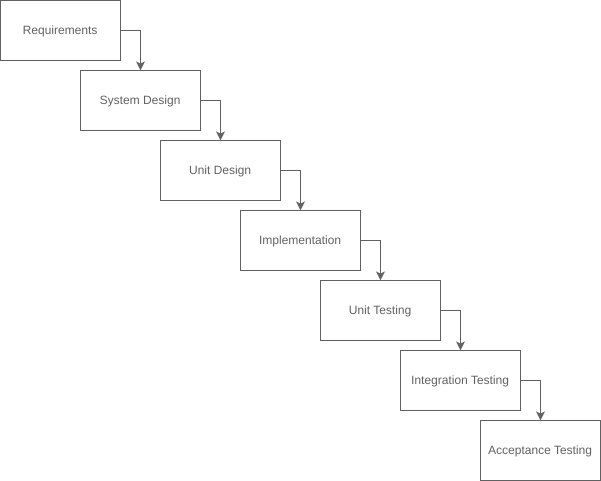
(c)The waterfall process model. Note that the model allows no back tracking.
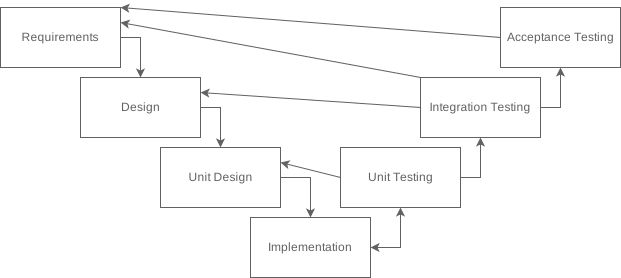
(d)The V process model.
Life cycle diagrams of two agile and two linear process models.
Agile processes have become ubiquitous in industry as they allow for tight feedback loops which ensures the product meets the needs of stakeholders, reducing the risk of misunderstandings. In a research context, by the time product software is being written, requirements and expectations for the software are necessarily fully understood and well-defined. Consequently, and contrary to industry trends, linear models are the most appropriate for research contexts. While researchers can be expected to define well-considered requirements, as amateur software engineers, it is rare that the design and programming techniques are mature enough to support the strict progression of a waterfall process. As such, a V model where downstream phases feed back into previous phases is ideal. For our model process, however, we will make a single change, disallowing feedback caused by downstream phases to change requirements, as seen in Figure 2.
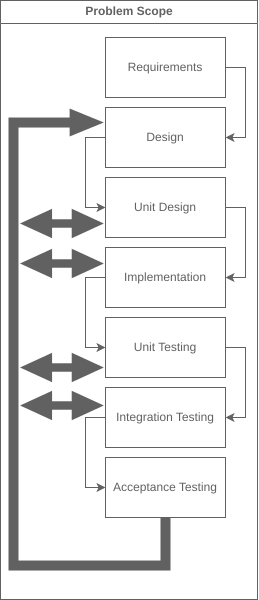
Figure 2:The feature V process model.
Often software products are developed by teams of engineers. In these team environments, it is important that the software process be easily parallelizable. Our modified V model can be parallelized as in Figure 3. Allowing the process to be utilized by individual researchers at primarily undergraduate institutions or large REU[3] projects.
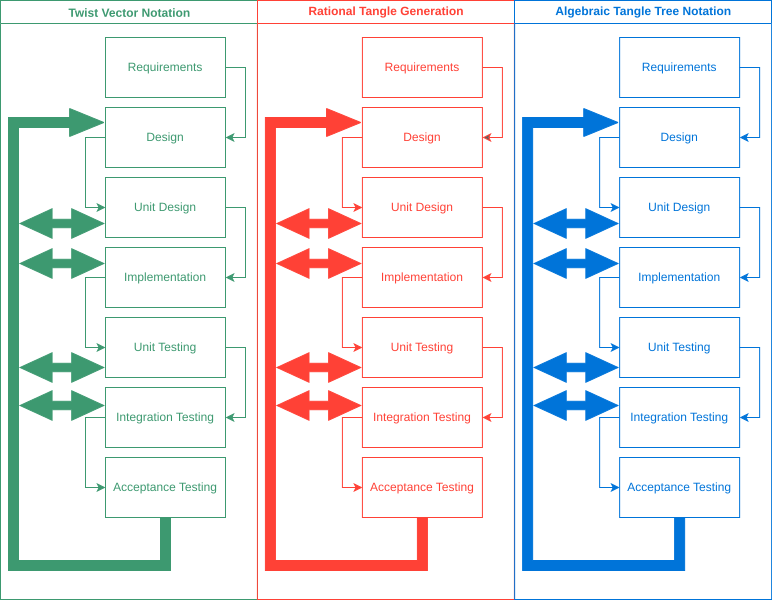
Figure 3:The feature V process model.
The remainder of this section describes each phase of our modified V model. In each subsection, we will describe the activities that should be carried out during that phase, as well as an overview of what, if any, diagrams we should expect to be created. The diagrams we will discuss for each phase are simplifications of standard UML 11 diagrams. Throughout the phases, we will use an implementation of the game of “Go Fish” as an example software product.
7.1.3.1Requirements
Requirements define the conditions and behaviors that are expected out of a system. Writing specific and non-ambiguous requirements is a surprisingly difficult task, for example, when writing a set of requirements for “Go Fish” we may define a requirement such as Example 1.
On its face, Example 1 seems to be a perfectly good requirement phrasing the “fishing” phase of a turn. However, if you put yourself in the shoes of a person who has never played “Go Fish,” you might be confused by how to ask for a card. Can the active player ask for a 10, or should they ask specifically for a ? Fixing this ambiguity in Example 1 can by done by making the requirement more precises Example 2.
In a research context, the phrasing of a requirement, as in Example 2 is often redundant. Most pieces of software in a rigorous mathematical context will have backing from theorems and definitions that unambiguously define what the software should do. This means we must change how we think about requirements in the research setting. Instead of requirements of the style of Example 2 we phrase requirements as use cases.
In this context, we may rephrase Example 2 as a use case, such as Example 3.
Use Case Diagram
One popular way to phrase and visualize a collection of use cases is a use case diagram
11. A use case diagram shows the connections between actors (Player and
Dealer in Example 4) and use cases (oval cells in Example 4). When an actor is connected
to a use case, we interpret that connection as the user being able to initiate (kicking off the
story the use case tells) that use case. In Example 4 we have a connection between use cases,
the “include” connection, this connection models a use case initiating another use case. The
“include” relationship is useful for generalizing behavior, in Example 4 we see the matching
use case included in both the fishing and drawing use cases.
7.1.3.2Software Design
After expectations of a system are set in the requirements phase, we can decompose the problem into a software design. Pressman and Maxim 2 outline eight principles (Definition 2) that guide this process. This problem decomposition tells us how to break the software into discrete pieces of functionality called units. Depending on the team, their needs, and the technologies they are using, a unit can be sized anywhere from a single function to a collection of files.
Diagrams
Block Diagram
To diagrammatically represent a software design, we utilize a modified block diagram. A block
diagram gives a high-level description of the discrete units of a software design and how those
units relate to each other. The units are given by blocks containing a descriptive title. Units that
satisfy similar use cases and may be abstractable to a common design are grouped together in
container blocks (User Interface in Example 5). Connections between blocks are recorded with
decorated arrows, the decorations indicate the multiplicity of the relationship between components,
such as 1 for a one-to-one, 1..* for a 1 to many, or *..1 for a many to 1 mapping.
Sequence Diagram
When the software design must account for communication between units, a sequence diagram may be
used. A sequence diagram records the actions and data transfers that actors (units) take during a
use case. A sequence diagram encodes time on the vertical axis, with actors as vertical lanes.
Interactions between actors over time are indicated by annotated arrows between lanes. Arrow
annotations are a description of the interaction taking place. Conditional sequences are indicated
by boxes delimiting the possible sequences of the interaction (is negative and is positive
subsequences in Example 6).
7.1.3.3Unit Design
As we proceed down the left side of the V model, we narrow our focus, progressively becoming less abstract and more concrete in our representation of our software. The software design gives us a description of what units we will need, but does not give an actionable description of those units. A unit description gives that actionable description, a language agnostic but directly implementable (programmable) description for what a unit contains and how a unit works.
A description for a unit contains the data members (variables) and the functional members a unit contains. Each of these items is described in two ways, first a plain English description, and second included diagrammatically in a class diagram 11 for the unit. The plain English description for each member describes what that member is intended to be or do. In the case of a functional memember, along with an English description, a diagrammatic definition as a state machine11 should also be given.
As with the special language/mood used when designing requirements (Section 7.1.3.1), documentation at the unit level and below have a particular frugal and direct style. When this style is first encountered it can be jarring, and the writing appear shockingly poor. However, just as the use of the indicative mood in requirements encourages precision, the style of documentation at this level serves a purpose. Documentation at this level is not intended to tell a story or describe a problem, but to directly define a computational unit one layer of abstraction above code. Simple direct language here encourages the clear communication of expectations and intents that translate to code. Complicated ideas, at this level, are easier to express (and consume) when presented diagrammatically. Our English descriptions serve simply to supplement the diagrams.
Diagrams
Class Diagram
A class diagram 11, containing a collection of blocks and their
relationships, similar to a block diagram. However, in a class diagram, the blocks are functional
subunits of a unit. Each block contains a set of data members followed by a set of functional
members. In an object aware language, such as Python or Java, a block might directly correspond to a
class in the language sense. In an imperative language, such as C, the blocks may correspond to one
or more .c or .h files.
Each member of the class is decorated to indicate public or private visibility, meaning, visibility
to the world outside the unit. A is used to indicate public visibility, meaning the member can
be seen and used by other classes, and a to indicate private visibility, meaning the member can
only be seen from inside the class. When referencing other units in the system, the external units
are truncated to an empty class (as in the Card class in Figure 6a). One or more optional
decorators can be added to a class to further contextualize the class. The decorators that we allow
in a class diagram are:
Enumeration: Indicating the class is an enumeration.
Interface: Indicating the class is an interface. This is usually used to simplify the diagram when common collections of data/functions need to be repeated.
External: Indicating the class is defined outside the current unit.
The relationships between classes are described by arrows between those classes. Each type of arrow
used in a class diagram defines a slightly different type of relationship. The arrows that we will
allow in a class diagram are the aggregation (Figure 6a) and the realization (Figure 6b).
The aggregation connection describes the relationship when one class uses (aggregates) the connected
class. In Example 7, a class diagram for a Go Fish player, we see the Player class using
(aggregating) the Hand class. In Figure 6b we see the realization connection, which
describes the relationship when a class implements an interface. An example can be seen in
Example 7 with the Hand and Book[4] classes realizing the CardCollection interface.
Both the Hand and Book classes are collections of multiple cards and will need common data, such
as a function to print all cards in the collection. This common (expected) data is modeled as an
interface that can be reused without needing to be rewritten.
(a)An aggregation connection. Class A aggregates Class B.
(b)A realization connection. Class A realizes Class B.
State Machine
A state machine 11 diagram describes the collection of states and transitions that a function can move between. When defining a state machine, we start with two special states. The first special state is the start state, indicated by a filled in circle, and the second special state is the end state, indicated by a filled in circle surrounded by a ring. Other states are recorded by a box with text describing the state. Decision points are documented with a diamond, with each path of the condition decorated with text.
7.1.3.4Implementation
Once the design of a unit is complete, we are ready to implement (program) that unit. There are no special activities in the implementation phase outside of programming effort. It is important to strictly follow the unit and system design in this phase. If deficiencies in design are found, the V model allows for that feedback to be pushed to earlier phases and addressed by flowing back through the V model. Good practice in the programming stage is to add a comment describing each unit implementation as well as each data an functional memeber. The goal of these comments is to briefly describe the code for future readers, but they cannot replace the written documentation from previous sections. Additional good practices are to consistently format the code with a common style, utilize good data hygiene with a version control system, and favor simple implementations over “clever”.
7.1.3.5Unit Testing
With implementation complete, we move to the right side of the V, which consists of the verification activities. The first verification phase is the isolated verification of each unit, called unit testing. In this phase, we design and carry out tests of the units we have implemented. When designing tests, it is important to draw from the unit design directly, instead of designing tests against the actual implemented code. Testing the code against the design ensures that we are not drawing the target around the arrow. Tests, particularly unit tests, can and should, be separated into two classes of tests. The first class is those on the “happy path”, validating that “good” well-formed input generates expected output, see Example 9. The second class are those on the “unhappy path”, validating that “bad” or malformed input is handled as expected, see Example 10. Each public, accessible to external units, interface of a unit should have at least one unit test. If validation in this, or the following phases, finds deficiencies in the design, the V model allows for that feedback to be pushed to earlier phases and addressed by flowing back through the V model.
Test Cards
As we walk up the right side of the V, instead of diagrams we utilize test cards. A test card is used to define a set of requirements that a test will be implemented against. Each test card has four fields with content as follows:
Test Name: The unique name for the test. This name is used in test reports to identify what has failed.
Description: The description of what the test is validating and how that validation works. This section may include text and diagrams.
Inputs: A set of inputs to feed the unit.
Outputs: The outputs that are expected when the inputs are fed to the unit.
The following are two examples of unit test cards for the Go Fish product. One test card is on the happy path, and one is on the unhappy path.
7.1.3.6Integration Testing
While working in software, it is rare for a system to have a single unit or a collection of units that are completely uncoupled (Definition 3). When we do have units that depend on each other, we call the process of sticking those units together, integration. We verified during the unit tests that implemented units work individually as expected. In the integration testing phase, we verify that implemented units work together as expected. Tests in this phase should be designed against the artifacts from the software design phase (Section 7.1.3.2) as well as the use cases defined in the requirements phase (Section 7.1.3.1).
7.1.3.7Acceptance Testing
When we have completed unit and integration testing, we have verified that the software, based on the design, doesn’t unexpectedly break and satisfies written requirements (use cases). However, we have not yet verified that the system satisfies what all stakeholders wanted. In our Go Fish example, this phase may include a presentation to a customer. This is the point where a customer may find that our interpretations of Example 1 disagree, and we update to Example 2.
7.2Survey of Knot Theory Software Tools
Having now established a model process for developing software we can start our efforts in developing a design for a general knot theory software toolbox. To begin, we explore a collection of tools currently in use in the computational knot theory space. Considering the strengths and shortcomings of these tools helps inform the requirements and possible use cases for our general knot theory software toolbox.
7.2.1KnotPlot
KnotPlot14 is a closed source[5] knot computation tool primarily and widely used for diagramming knots, this includes several diagrams in this thesis. KnotPlot was developed as a portion of Dr. Robert Scharein’s PhD thesis 14, he is also the primary maintainer. The primary interface for KnotPlot is by interacting with a GUI[6]. This makes the onboarding process for non-technical users, including undergraduate researchers, straightforward and the learning curve shallow. KnotPlot includes many export options and specialized research computational tools, some undocumented. While support is readily available from Dr. Scharein this can make power use of KnotPlot difficult. KnotPlot has recently added a programmatic interface allowing general scripting in the programming language Lua. This scripting interface allows for custom diagramming and custom components. These custom scripts are limited however by the hooks available in KnotPlot. It is not always clear what calls to make into KnotPlot to accomplish your goals. Additionally, since the Lua interface is compiled into KnotPlot and isn’t a language widely used in research, finding supported external libraries can be difficult. KnotPlot is an unparalleled knot diagramming tool, but the environment becomes a walled garden that can be difficult to build into a tool chain.
7.2.2Mathematica Libraries
KnotTheory 15 and LinKnot 16 are collections of knot theory tools and datasets that are used with the Wolfram Mathematica system. Both KnotTheory and LinKnot are open source[7] and available for download. Mathematica is a natural environment for mathematics research, as the language syntax is similar to written theoretical mathematics. This similarity of appearance lowers the learning curve for use of the tooling. Mathematica is also commonly used in undergraduate calculus sequences, making the onboarding of undergraduate researchers straight forward. The interfaces defined by both KnotTheory and LinKnot are natural in the Mathematica context, further shallowing the learning curve for those already familiar with Mathematica. Additionally, both collections are well documented by the website “knot atlas” 15 and the textbook “LinKnot” 16 for KnotTheory and LinKnot, respectively. Unfortunately, neither collection is under active development or maintenance, with the last published versions from 2016 for KnotTheory and 2011 for LinKnot. Additionally, neither collection is released under version control, has a bug log, or has a published test suite. Missing the traceability implicit in these artifacts makes program correctness something that must be considered when using the collections.
7.2.3SnapPy/SnapPea
SnapPy 17 is a Python wrapper for SnapPea, which is a collection of C libraries. SnapPy and SnapPea are open source and published in the same GitHub repository which includes bug reporting and test suites. SnapPy’s Python bindings allow researchers to leverage the massive Python ecosystem, allowing for wide and varied usage. SnapPy can be utilized in anything such as a simple command line tool, GUI tool to draw knots, or a web application doing knot computations. This allows SnapPy to be tailored to the needs of individual researchers, allowing for simple subsets of functionality to be presented to undergraduate researchers. Each of these uses benefits from the decoupling of SnapPy and the core logic in SnapPea, allowing for fast execution of the SnapPea C code, but simple supportable Python bindings. The SnapPea layer, however, is designed on an ad hoc basis, meaning each file/unit stands alone with little structural overlap. If a developer wants to reuse the SnapPea C layer directly, they must reverse engineer the structures they wish to reuse.
7.3Architecture of A Knot Theory Software Toolbox
In Section 7.2 we discussed prior art in the knot computation space, in this section we utilize that analysis to design a software architecture for a general knot theory software toolbox. To complete this design, we will execute the first two phases of the modified V model we developed in Section 7.1.3.
7.3.1Requirements
In this section we carry out the requirements phase of the modified V model. We will create a set of requirements and use cases that model the expectations we have for a general knot theory software toolbox. First, we would like our system to be easy to use. As we saw, easy to use can encompass various possibilities. We can capture all of these possibilities by decoupling the theoretical functionality from the user interfaces, and instead we will implement specific interfaces for specific users.
This design goal allows the interface to be a Jupyter notebook during undergraduate knot theory class, a Mathematica library for research, or a tool run on a university cluster for high-performance needs. With any possible target environment as a goal, the system must not be coupled to a particular platform (Windows, Linux, etc.), informing our second requirement.
The tools we saw in Section 7.2 are all what we may call monolithic, meaning, from a development perspective, if the tool is to be used as a part in a new system, the whole tool must be included. In general, it is preferable to include only the functionality a system actually requires. For example, consider a system is being built to teach a seminar on constructing the Jones polynomial. That system will need to include a Jones polynomial component. Needing to pull in at the same time a hyperbolic volume component that serves no purpose, needlessly increasing the complexity of the system. These extensibility goals inform an encapsulation design goal.
Encapsulating each feature allows for the system components to be used by developers to build projects or products. However, as we saw in our discussion of SnapPy (Section 7.2.3), encapsulation itself does not remove all difficulty in reuse. We can further lower the difficulty of reuse by increasing commonality between components without coupling the components. This is accomplished by ensuring that every system component adheres to a set of common design patterns.
Finally, we can further reduce the overhead of reuse we enforce a common development process on system components.
We now develop a collection of use cases that address the high-level behaviors expected by the general knot theory software toolbox.
A use case diagram for the listed use cases.
7.3.2Software Design
With a set of requirements for our design, we can now describe a software design. Each requirement can be partitioned into one of two classes of requirements, functional or non-functional. Where, a functional requirement can impact the implementation of code and a non-functional requirement cannot. We start by addressing a software design for the non-functional requirements:
User Interface Goals
Portability Goals
Documentation Goals
The user interface goal is satisfied by simply excluding any user interface design from the software. The portability goal tells us that we need to pick a technology stack that is supported on the maximal number of platforms. The clear choice is to implement the software in the C language. The C language is widely used, and a C compiler exists to target just about any platform. The following is a selection of C compilers and tool chains and their targets:
Cython 18: “Cython is a Python compiler that makes writing C extensions for Python as easy as Python itself. Cython is based on Pyrex, but supports more cutting edge functionality and optimizations.” - Cython Documentation
GNU19: A C compiler that can has around 200 targets including
x86_64
ARM
Motorola 68000
PowerPC
Emscripten 20: Compiles C to WebAssembly 21 allowing for C code to be used in web systems.
Embedded compilers: Various compilers for esoteric embedded systems.[8]
Selecting C for an implementation language has some risks, primarily caused by the low-level[9] nature of C. As a low-level language, C has no built-in garbage collection mechanism, that is, memory can be allocated but is not unallocated automatically. To mitigate this risk in C development we disallow memory allocation in our components. Any memory allocation must happen in the user interface layer, and then buffers with known sizes shall be passed to the functional components.
To address the two remaining functional requirements, encapsulation goals and pattern goals, we define a collection of generic component interfaces that cover common use cases we described in the previous section. We also model these interfaces as a block diagram demonstrating the relationship between the interfaces.
Runner: The runner interface serves as the stand-in for user interfaces. Since we are decoupling the interface from the functionality, there is no further design consideration for the runner interface.
Runnables: Runnables serve as the functionality that is called by a runner.
Computation: The computation interface is a runnable that operates in a one call, one return program flow (one thing in one thing out). Example: Compute Jones Polynomial and Compute Writhe.
Generator: The generation interface is a runnable that operates in a one call, multiple return flow (one thing in many things out). Example: generate rational tangles, generate Montesinos tangles, and generate arborescent tangles.
Data Wranglers: Data wranglers serve as a non-user facing layer used by runnables to handle data.
Notation: The notation interface defines data structures used to represent knot data. Additionally, the interface describes the translation between string representations and data structures. Example: Conway notation, algebraic tangle tree notation, and weighted planar tangle tree notation.
Storage: The storage interface serves the need for components to read and write from external systems. Examples: the command line or a database.
A block diagram of the architecture of a knot theory software toolbox
A book is the matched sets of cards that are counted at the end of Go Fish to determine the winner.
At the time of writing “Python for Everybody” by the University of Michigan is a great choice.
A collection of quality goals that need to be satisfied to call a step “complete”.
Research Experiences for Undergraduates, a program funded by the National Science Foundation (NSF).
Closed source software is a software product with no published source code.
A graphical user interface, such as a Windows or the screen on a copy machine.
Open-source software is a software product with publicly published source code.
An embedded system is a small, usually low power, computer (microcontroller) that is built into a product. For example, the power seat of your car is an embedded system.
A low-level language such as C or Rust compiles to machine code that runs directly on the hardware. A high-level language is one that abstracts functionality away from hardware.
- Wiggins, G. P., & McTighe, J. (2008). Understanding by Design (Expanded 2nd ed, [Nachdr.]). Association for Supervision and Curriculum Development.
- Pressman, R. S., & Maxim, B. (2015). Software Engineering: A Practitioner’s Approach (Eighth edition). McGraw-Hill Education.
- Starr, J. (2025). Joecstarr/MfaCoBPM: V1.0.0 (v1.0.0) [Computer software]. Zenodo. 10.5281/ZENODO.14933990
- Sipser, M. (2013). Introduction to the Theory of Computation (Third edition, international edition). Cengage Learning.
- Beck, K., & Andres, C. (2012). Extreme Programming Explained: Embrace Change (2. ed., 11. print). Addison-Wesley.
- Nonaka, I., & Takeuchi, H. (1986). The New New Product Development Game. Harvard Business Review. https://hbsp.harvard.edu/product/86116-PDF-ENG
- Benington, H. D. (1983). Production of Large Computer Programs. IEEE Annals of the History of Computing, 5(4), 350–361. 10.1109/MAHC.1983.10102
- Forsberg, K., & Mooz, H. (1991). The Relationship of System Engineering to the Project Cycle. INCOSE International Symposium, 1(1), 57–65. 10.1002/j.2334-5837.1991.tb01484.x
- DonWells. (2010). Extreme Programming.Svg. https://commons.wikimedia.org/wiki/File:Extreme_Programming.svg
- Lakeworks. (2008). The Scrum Project Management Method. https://commons.wikimedia.org/wiki/File:Scrum_process.svg
- Unified Modeling Language, v2.5.1. (2017).
- Parlett, D. (2009). The Penguin Book of Card Games. Penguin Books.
- Gamma, E. (Ed.). (1995). Design Patterns: Elements of Reusable Object-Oriented Software. Addison-Wesley.
- Scharein, R. G. (1998). Interactive Topological Drawing.
- Bar-Natan, D. (n.d.). KnotTheory. https://drorbn.net/AcademicPensieve/Projects/KnotTheory/